Showing posts with label Formulas. Show all posts

Thursday, September 24, 2009

When E is not... E?

I was working on a family here at the company, and it turned out we need to use a formula that involved using a Log function (you remember Calculus right? Cause I don't.....). In excel the Natural Log (that is the log taken of e, your handy dandy mathematical constant) is notated with the function ln(). Which is fine and dandy. If you look in Revit help under valid syntax, is conveniently says that the "log" can be taken of any number, what they fail to mention is the base the Revit log function operates in, which is 10, not e (bummer :( )

But....! If you do enough research (or remember enough Calculus) you find out that Logs in base 10, can be converted to Logs in another base, by some simple alegabra. (hooray!) Even better, Revit help clearly states that the function exp() will raise e to the specified power, so therefore we could write:

= log()/log(exp(1))

and we would get the result we need, since a number raised to the power of 1, will simply be the original number. This is good, because theoretically this means that Revit (and or your computer) will use e calculated to the most accurate value the program (Revit) will accept (you're still with me, right?).

Yet, for some reason, Revit's result did not agree with Excel . With a little more help from some friends (read the whole AUGI thread here) it was discovered that the function exp() resulted not in raising e to the specified power, but 10!!! So, exp(1) = 10 in Revit, contradicting Revit's own help documenation!

Now I ask, why would we ever need a function that raises 10 to a power? I can always write: 10^2, 10^2..... I can even use parameters for both values if I need to, 10 is a number, not too hard to deal with. I would much rather have access to e particularly since I need it!

For now, we're using a truncated value for e in our formula, and its close enough, but I would say, with relative certainty that somewhere (quite a long time ago) someone made a mistake...

Not that too many people are running around using Logs and e in their Revit formulas, but with the advent of the new massing tools, it could become a possibilty. Besides, its the principal of the matter, right, we should have access to our standard mathematical functions, and the documentation should be correct!

Sunday, January 27, 2008

+/- offset(s) for families

So have you ever wanted to give users the ability to offset and object either plus or minus a certain distance from a constant reference point. Like maybe you have a custom curtain panel family that you want the user to be able to plug in 1' 0" to offset the panel forward one foot from the curtain wall centerline, or you want them to be able to put -6" into the same field and have the panel move backwards 6" away from the centerline. Well, here is the code and instructions:

1.) Create two reference planes, depending on what is important in your family they might represent the front face, back face or centerline of the panel/object. (For our demonstration we'll assume that we're using the front face.) Name one reference plane, "forward offset", name the other "front of panel". Make sure the forward offset ref plane is forward of the front of your constant (in this case the ref plane that is in the curtain panel template named "front"). Make sure the "front of panel" ref plane is behind your constant.

2.) Now create a dimension from your constant to the "forward offset" ref plane. Select the dimension and make it a parameter called "Offset Forward". Next create a dimension from the "forward offset" ref plane to the "front of panel" ref plane. Make this dimension a parameter and call it "Offset Back".

3.) Go into the Family Types dialog box. Create a new parameter called "Offset" set it be a length type of parameter. You can leave it at its default of 0' 0" or change it to some value, positive or negative.

4.) In the formula fields of our other two paremters enter this information:

Offset Forward - = if(Offset > 0', Offset, 0')
Offset Back - = if(Offset < 0', abs(Offset), 0')

That should be it, with the addition of the two formulas the offset will automatically go forward or back based on the positive or negative value entered into the "Offset" parameter. As long as I didn't screw up the order of the dimension strings to reference planes it will work just fine.

Thursday, September 06, 2007

Follow-up to Type Catalogs

Justin had a question comment, and I'll try to respond. I've posted two screen shots, one of the type catalog in Excel, and another of the family types dialog box from a related family (in this case lab casework). You can see in the Revit screen shot the parameter "Rear Panel Access" essentially we want to be able to turn this on or off, as any cabinent can include an access panel, but they don't have to.
So rather then having two different familys, we use a "Yes/No" to control the visibility of some symbolic lines, and also fill in a shared parameter than can be scheduled to indicate if an access panel is required. (make sure to click on the images to get the full size image to see the details).

Monday, August 21, 2006

Mathmatical Forumlas in Families

This post actually comes from my friend David who orginally posted it on AUGI. Since I can never keep track of items in forums I decided to repost it here. Enjoy.

---------------------------------------------------------------------------------------------

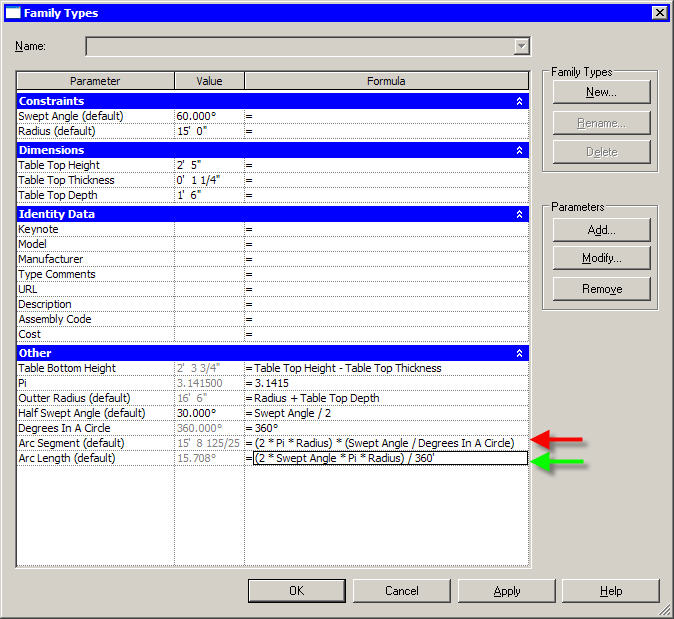
Not a math genius, or even a Revit one (or else I would have spent way less time figuring this out) but I think I have a way to deal with the "Inconsistent Units" error message. I had a problem in which I needed to calculate the arc lengths of some segments. I used a slightly different method (from previous posters, Ed), but the critical piece (the "Inconsistent Units" error) was the same. In the end I realized that Revit, just like my Chemistry teacher, expects me to cancel units in my equations. Even though WE know that the units cancel out (and that Pi is unit-less) Revit is quite literal: Pi is a number, arc length is an angle, radius is a Length and so on. It cannot see how you could possibly relate them with mathematics.

As you realized, you can trick Revit in a couple of ways, I am attaching a screen shot of two examples. In the first (Green Arrow) I added incorrect units to values. You can see this makes the equation "work" but yields an answer in degrees whilst we want feet and inches. The second way, (red Arrow) is to break up your equations so that portions of them yield "unit less" values, and then combine them at will. Of course you could get this functionality in a single equation, so long as your units all cancel to yield whatever parameter type you are supposed to have.